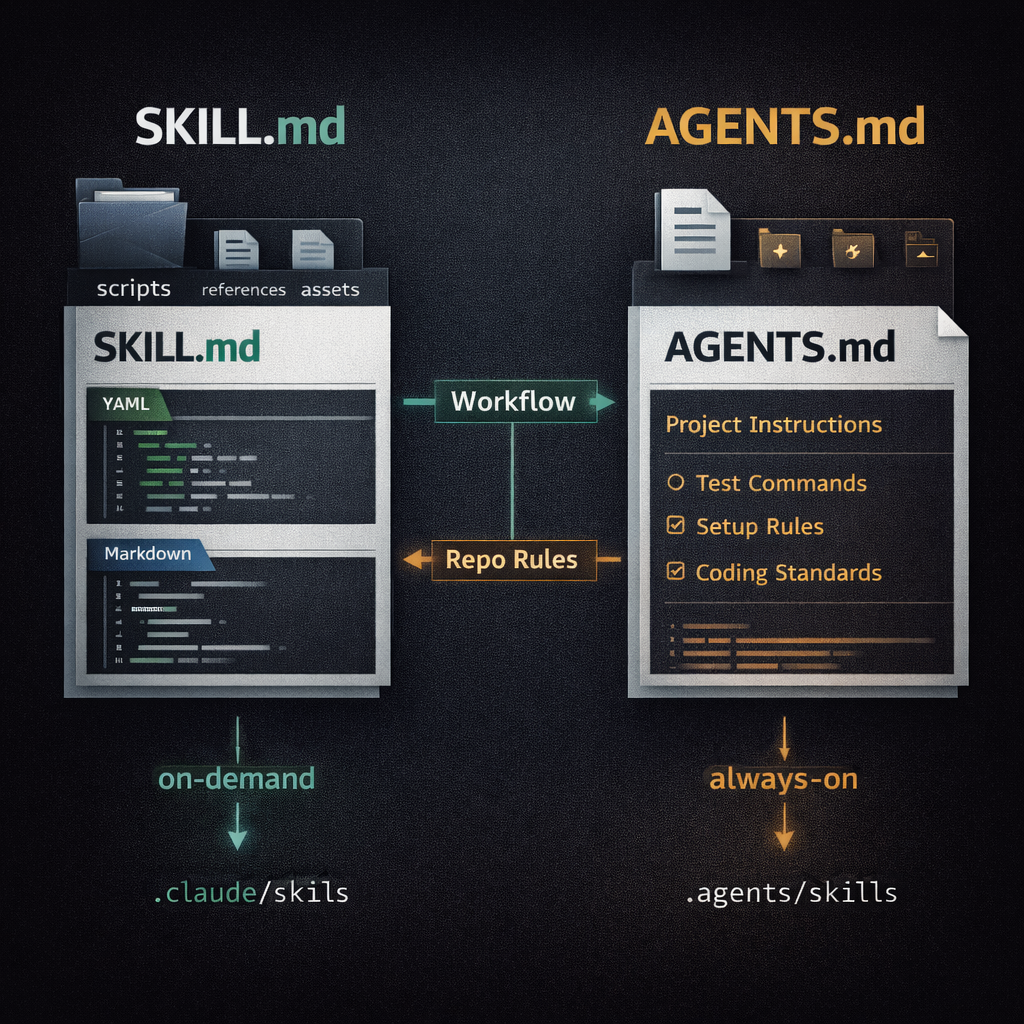
The Short Answer
AGENTS.md is for persistent instructions. Codex reads it before doing work, so it is the right place for setup commands, test commands, coding standards, architecture notes, security rules, and project-specific expectations.
SKILL.md is for reusable capabilities. A skill packages a workflow, instructions, optional scripts, references, and assets. Codex sees the skill metadata up front, then loads the full SKILL.md only when the task matches or the user invokes the skill.
Use both in serious repositories. Put stable project rules in AGENTS.md. Put repeatable procedures such as release checks, migration reviews, incident triage, spreadsheet export, or domain-specific analysis in .agents/skills/<skill-name>/SKILL.md.
SKILL.md vs AGENTS.md Comparison
The cleanest mental model is simple: AGENTS.md is the agent's project handbook, while SKILL.md is an on-demand playbook.
| Area | AGENTS.md | SKILL.md |
|---|---|---|
| Primary purpose | Always-on repository or global instructions for Codex and other coding agents. | Reusable task workflow that adds a specific capability to an agent. |
| Loads when | Before Codex starts work, as part of the instruction chain. | When selected explicitly or when the task matches the skill description. |
| Best content | Setup, tests, architecture, coding style, PR rules, security expectations, repo conventions. | Step-by-step task flows, scripts, reference files, templates, examples, edge cases, safety gates. |
| Structure | Plain Markdown. No required fields. | Skill folder with SKILL.md, YAML frontmatter, Markdown body, and optional scripts/, references/, and assets/. |
| Codex repo path | AGENTS.md or AGENTS.override.md in the repo root or nested directories. |
.agents/skills/<skill-name>/SKILL.md in the current directory, parent directories, or repo root. |
| User-level path | ~/.codex/AGENTS.md or ~/.codex/AGENTS.override.md. |
$HOME/.agents/skills/<skill-name>/SKILL.md. |
| Conflict handling | Later, more specific guidance is appended after earlier guidance and can override it. | Skills do not merge by name in Codex; matching skills can appear separately in selectors. |
| Context cost | Higher if overused, because it is loaded at the start of work. | Lower for specialized workflows, because the full body loads only when needed. |
Use AGENTS.md For Always-On Project Guidance
AGENTS.md should contain information the agent needs on most tasks in the repository. If a rule should shape nearly every edit, put it here.
- How to install dependencies and run the app.
- Which test, lint, and typecheck commands matter before finishing.
- Project architecture and important directories.
- Code style and naming conventions.
- Security, privacy, deployment, and data-handling rules.
- Pull request, commit, and documentation expectations.
# AGENTS.md

## Repository Setup
- Install dependencies with `pnpm install`.
- Start the app with `pnpm dev`.
- Run database migrations with `pnpm db:migrate`.

## Checks Before Finishing
- Run `pnpm lint` after editing TypeScript or React files.
- Run `pnpm test -- --runInBand` when changing shared logic.
- Mention any checks that could not be run.

## Code Style
- Use TypeScript strict mode.
- Keep server-only code out of client components.
- Prefer existing helper functions before adding new abstractions.

## Security
- Never print secrets, tokens, or customer data in logs.
- Ask before adding production dependencies.
Use SKILL.md For Reusable Workflows
SKILL.md should contain a focused procedure that is useful more than once and too detailed to keep in the always-on repo instructions. The description is important because Codex uses it to decide when the skill applies.
- Release checklists.
- Incident triage.
- Security review workflows.
- Feature flag rollout procedures.
- Domain-specific data analysis.
- Document, spreadsheet, or presentation generation workflows.
---
name: release-checklist
description: Validate release readiness. Use before tagging a release, publishing a package, deploying production code, or preparing release notes.
---

# Release Checklist

## Steps
1. Check the working tree and current branch.
2. Read the release notes draft if one exists.
3. Run the required checks from AGENTS.md.
4. Confirm version changes, migrations, feature flags, and rollback notes.
5. Report blockers before suggesting a release command.

## Safety
- Do not create tags or deploy unless the user explicitly asks.
- Ask before running commands that publish, push, or mutate production state.
How Codex Loads Each File
Codex treats AGENTS.md and skills differently.
- AGENTS.md: Codex builds an instruction chain when it starts. It can read global guidance from
~/.codex, then project guidance from the repo root down to the current working directory. - AGENTS.override.md: Codex checks override files before regular
AGENTS.mdfiles at a given scope. - SKILL.md: Codex discovers skill metadata from skill folders, then loads full skill instructions only when a skill is used.
- Context limits: Codex has a project document byte limit for loaded instruction files, so bloated
AGENTS.mdfiles can be truncated or crowded out.
Recommended Repository Layout
This layout gives Codex a small always-on instruction chain plus focused on-demand workflows.
your-repo/
|-- AGENTS.md
|-- .agents/
|   `-- skills/
|       |-- release-checklist/
|       |   |-- SKILL.md
|       |   `-- references/
|       |       `-- release-risk-table.md
|       `-- security-review/
|           |-- SKILL.md
|           `-- scripts/
|               `-- scan_changed_files.sh
|-- services/
|   `-- payments/
|       |-- AGENTS.override.md
|       `-- .agents/
|           `-- skills/
|               `-- payments-runbook/
|                   `-- SKILL.md
`-- README.md
In this setup, AGENTS.md explains how the repo works. The root skills cover general workflows. The payments service can override local rules and define a payments-specific runbook.
Decision Rules
When you are unsure where to put something, use these rules.
- Put it in
AGENTS.mdif the agent should consider it on almost every task. - Put it in
SKILL.mdif it is a repeatable workflow that should load only sometimes. - Put commands in
AGENTS.mdwhen they are standard repo checks. - Put commands in a skill when they are part of a specialized multi-step process.
- Put long reference material beside a skill when it is only useful for that skill.
- Put architecture rules in
AGENTS.mdwhen they affect everyday coding decisions.
Bad Patterns To Avoid
Putting every workflow in AGENTS.md
This makes every session carry specialized instructions that may be irrelevant. Move large release, audit, migration, and incident workflows into skills.
Putting core repo rules only in a skill
If the rule matters for most edits, the agent may miss it until the skill activates. Keep core project expectations in AGENTS.md.
Duplicating contradictory rules
If AGENTS.md says one test command and a skill says another, the agent has to resolve the conflict. Use AGENTS.md as the source of truth for standard checks, and make skills refer back to it.
A Clean Combined Template
Use this pattern when starting a new repository.
# AGENTS.md

## Standard Checks
- Run `pnpm lint` after editing app code.
- Run `pnpm test` after editing shared logic.
- Report checks that could not be run.

## Available Workflows
- For release readiness, use the `release-checklist` skill.
- For security-sensitive changes, use the `security-review` skill.
- For database migrations, use the `migration-review` skill.

## Project Rules
- Keep API input validation close to route handlers.
- Keep customer data out of logs.
- Use existing UI components before adding new ones.---
name: security-review
description: Review security-sensitive code changes. Use when authentication, authorization, permissions, secrets, logging, payment flows, user data, or network boundaries change.
---
# Security Review
## Steps
1. Identify changed files and affected boundaries.
2. Check authentication and authorization paths.
3. Look for secret exposure, unsafe logging, and data leakage.
4. Check input validation and output encoding.
5. Summarize risks by severity and list follow-up tests.How To Split An Overgrown AGENTS.md
If your AGENTS.md has become a dump of every workflow the team has ever written, split it without losing behavior.
- Keep setup, standard checks, architecture, and coding rules in
AGENTS.md. - Move long workflows into
.agents/skills/<name>/SKILL.md. - Move deep reference material into each skill's
references/directory. - Add a short "Available Workflows" section in
AGENTS.mdthat names the skills. - Test each skill with explicit
$skillinvocation and with a natural-language prompt.
Common Questions
Does AGENTS.md replace SKILL.md?
No. AGENTS.md gives Codex persistent instructions. SKILL.md gives Codex an on-demand capability.
Should build commands go in AGENTS.md or SKILL.md?
Put standard build, lint, test, and typecheck commands in AGENTS.md. Put specialized commands in a skill when they are part of a specific workflow.
Should every repo have AGENTS.md?
For Codex-heavy repos, yes. Even a short file with setup commands, standard checks, and project rules is useful.
Should every repo have skills?
Only when repeated workflows justify them. A small repo may only need AGENTS.md. A mature repo usually benefits from a few focused skills.
Sources Used
This guide is based on primary documentation and open format references:
