Gourmet Street Food Photography and Infographic
GPT Image 2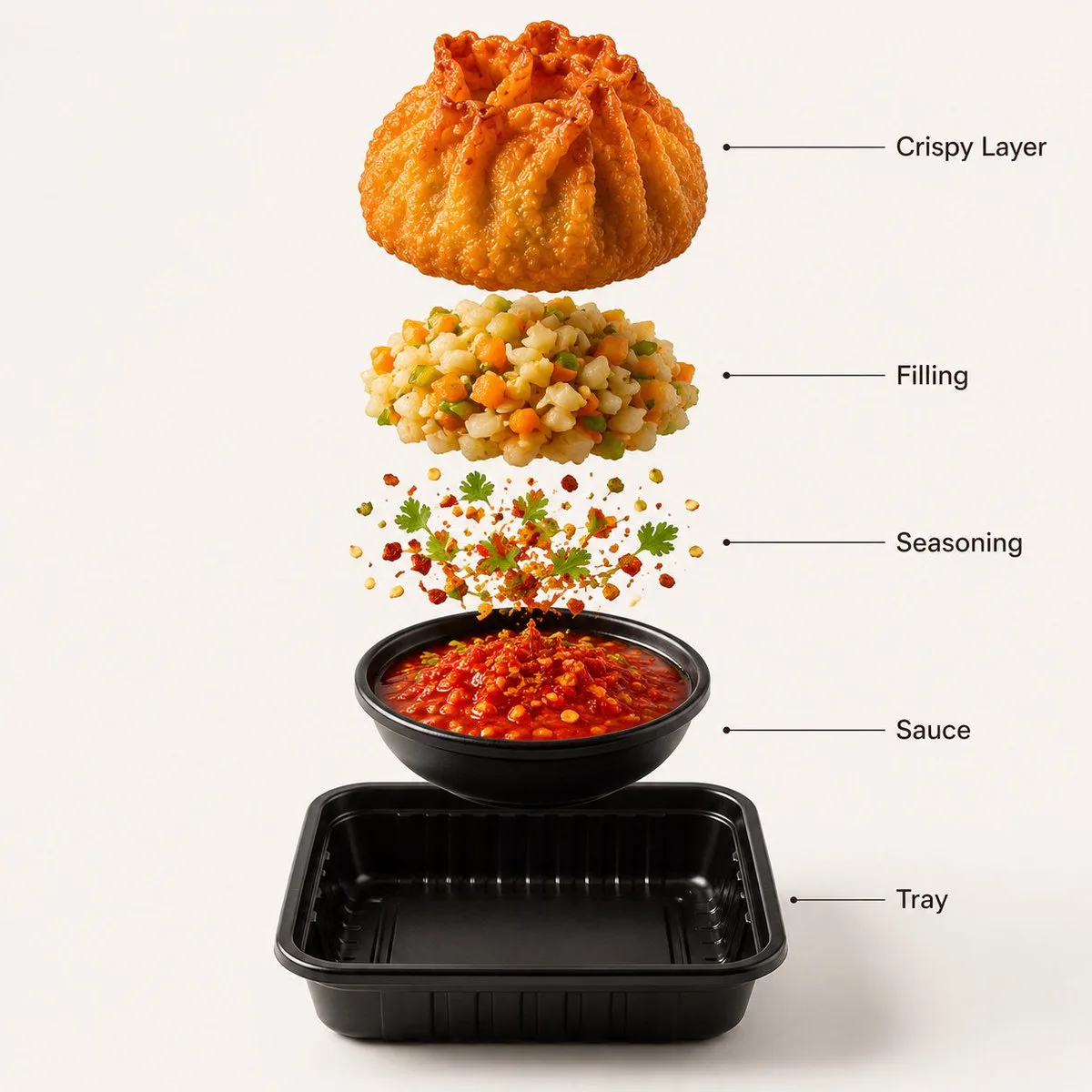
Image 1 Prompt:- A premium street-food product photograph of {argument name="food item" default="crispy fried momos"} arranged in a {argument name="tray" default="black serving tray"}, centered against a warm {argument name="background" default="White seamless studio background"}. The momos have a deep golden crispy texture with realistic oil shine and crunchy folds. Fresh green herbs and spicy dipping sauce add contrast to the composition. Soft cinematic lighting creates rich highlights and subtle shadows beneath the tray. Ultra-sharp focus, DSLR macro food photography, premium fast-food advertisement style, hyper realistic, 8K. Image 2 Prompt: - Create a hyper-realistic exploded vertical infographic composition of fried momos. Top → Bottom structure: Crispy Outer Layer (golden crunchy fried texture with crisp folds) → Vegetable Filling (finely chopped vegetables with vibrant color) → Spice Seasoning (floating chili flakes and herbs) → Sauce Layer (spicy red dipping sauce texture) → Tray Base (minimal black serving tray) All elements must be perfectly centered and evenly spaced vertically. Use a warm White seamless studio background with soft commercial lighting and realistic shadows beneath each floating layer. The composition should feel like a premium street-food advertisement combined with a clean infographic layout. Add clean minimalist text labels with thin pointer lines using these exact labels: “Crispy Layer” “Filling” “Seasoning” “Sauce” “Tray” Ultra-realistic texture detail, premium food photography, 8K.
Grok AI Editorial Infographic Poster
GPT Image 2
Search the web for detailed information about {argument name="topic" default="Grok AI"} including its development history, underlying architecture, technical capabilities, training methodology, real-world applications, cultural impact, major breakthroughs, controversies, notable model versions, and surprising lesser-known facts. Then create a dramatic editorial infographic poster in the style of a {argument name="style" default="National Geographic feature"} — but for groundbreaking artificial intelligence. The most powerful and recognizable visual representation of Grok is the full-bleed atmospheric hero filling the entire poster top to bottom, dramatically lit and color-graded in deep black, electric blue, chrome silver, and cosmic neon tones matching Grok’s rebellious futuristic identity. Oversized bold typography with the word ‘GROK’ dominates the upper portion in a sleek sci-fi font inspired by space technology and cyberpunk interfaces. Text and graphic panels float naturally over the image as editorial overlays — not boxed magazine layouts. Include: release year and creator/company (xAI / Elon Musk), model architecture and parameter scale, training data scale and computing infrastructure, key capabilities and benchmark performance, integration with X (Twitter), adoption statistics and market influence, launch milestones, famous public demos, major achievements, cultural significance, and 3 surprising lesser-known facts. A technical specification panel on one side showing architecture, multimodal abilities, reasoning features, context window, API ecosystem, and compute power. A timeline of Grok’s major breakthroughs and releases along the bottom. Include references to real-time internet integration, humor-driven personality, open-source initiatives, and competition with other frontier AI models. Color palette and mood drawn entirely from Grok’s own visual identity — cinematic, edgy, intelligent, futuristic, slightly rebellious. No white background, no magazine grid, no boxed sections. Everything layered organically over the full-bleed hero image. Aspect ratio 4:5. Dense, tactile, cinematic, unmistakably Grok.
Cream 3D China Divorce Data Chart
GPT Image 2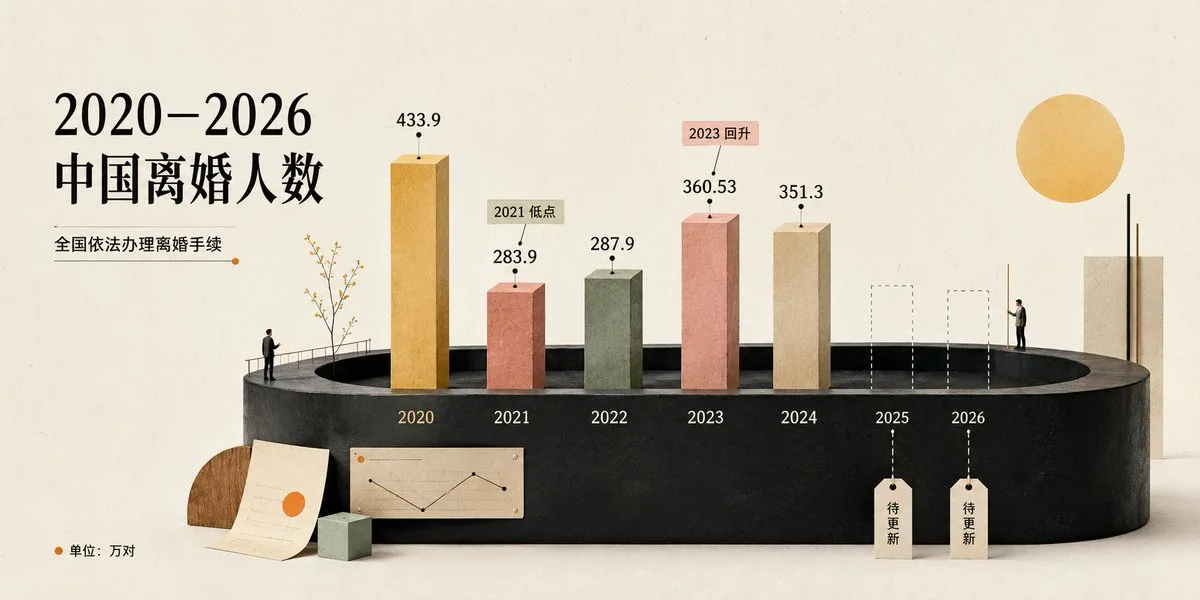
Goal: Create a cream-toned 3D editorial data visualization poster about {argument name="headline text" default="2020–2026 中国离婚人数"}, showing divorce counts in China with a refined miniature diorama style. Canvas: Wide horizontal 2:1 composition, warm off-white paper background with subtle grain, soft shadows, minimalist premium infographic aesthetic. Use a muted cream, black, terracotta, sage, ochre, and beige palette. Layout: Place the main title on the upper left in large elegant black serif Chinese typography. Under it, add the subtitle {argument name="subtitle text" default="全国依法办理离婚手续"} with a thin horizontal rule ending in a small orange dot. The central focus is a black oval/cylindrical stage platform spanning the lower middle of the image, viewed in slight perspective. On the platform, arrange exactly 7 year positions from left to right: 2020, 2021, 2022, 2023, 2024, 2025, 2026. Data bars: Show exactly 5 solid rectangular 3D vertical bars for years 2020–2024 and exactly 2 dashed-outline placeholder bars for 2025 and 2026. Use these visible values and labels: 2020 ochre-gold tall bar labeled 433.9; 2021 terracotta bar labeled 283.9 with a small callout tag reading “2021 低点”; 2022 muted sage-green bar labeled 287.9; 2023 salmon-pink bar labeled 360.53 with a small callout tag reading “2023 回升”; 2024 beige bar labeled 351.3; 2025 dashed empty bar with a hanging tag reading “待更新”; 2026 dashed empty bar with a hanging tag reading “待更新”. Put each year label in white or pale text along the front face of the black platform beneath its position. Supporting visual elements: Include exactly 2 miniature human figures: one standing near the left side of the stage railing looking toward the chart, and one standing on the right side near the 2026 area. Include a delicate small tree with thin branches near the 2020 bar. Add one large warm yellow sun circle in the upper right. Add a tall cream rectangular architectural block at the far right behind the platform. At the lower left foreground, add exactly 3 desk-like props: one semicircular wood block, one off-white paper sheet with faint chart lines and an orange dot, and one small pale green cube. On the front lower center of the platform, add one small beige inset chart card showing a simple black line chart with an orange dot. Legend and text: In the bottom-left corner, add an orange dot followed by “单位:万对”. Keep all Chinese text crisp and readable. Use the data source/style as a polished social-media infographic, not a scientific chart. Style constraints: Soft natural lighting, realistic paper and plaster textures, subtle 3D depth, clean negative space, no watermark, no extra years, no extra bars, no additional text beyond the specified labels. Use {argument name="background color" default="warm ivory"} as the overall background tone and {argument name="accent color" default="orange"} for dots and highlights.
Emotional Expression Performance Grid
GPT Image 2
Create a clean 4x4 emotional performance grid using the provided character as the fixed identity reference. Visual style: Clean modern graphic design layout. Elegant serif header at the top, soft off-white background, even spacing, small readable handwritten-style labels centered below each panel. Header text: “Couple's CUTE ↔ CRAZY SCALE” Preserve strict facial identity consistency across all 16 panels. Follow the exact emotional progression from top-left to bottom-right. Do not randomize expressions or intensity. GRID ORDER: Row 1: 1. soft innocent cute 2. shy cute 3. playful cute 4. teasing cute Row 2: 5. energetic cute 6. chaotic playful 7. emotionally intense 8. unstable smile Row 3: 9. overly excited 10. wild eyes 11. manic happiness 12. emotionally unhinged Row 4: 13. chaotic stare 14. dangerous excitement 15. beautiful insanity 16. fully crazy Format: 4x4 grid, cinematic portrait photography style, neutral background, tight close-up framing, shallow depth of field, no watermark.
Prompt
GPT Image 2
Create a high-end beauty editorial infographic based on the uploaded portrait photo. Preserve the real facial identity and recognizable facial features. Maintain natural skin texture and realistic proportions. Style: [在这里替换风格] Layout: Luxury fashion magazine
Exploded Food Infographic Composition
GPT Image 2
Create a hyper-realistic exploded vertical infographic composition of {argument name="food item" default="tacos"}. Top → Bottom structure: Fresh Lettuce (crisp green texture with natural folds) → Tomato & Salsa Layer (juicy diced tomatoes and salsa mix) → Melted Cheese (smooth cheddar texture) → Grilled Meat Filling (juicy seasoned meat detail) → Taco Shell Base (crispy golden shell texture) Perfect vertical alignment, rustic background, soft studio lighting, realistic shadows beneath each floating element. Add clean infographic text labels with thin pointer lines using these exact labels: “Lettuce” “Salsa” “Cheese” “Meat” “Shell” Ultra-detailed food textures, premium commercial aesthetic, 8K.
Fashion Blueprint Concept Sheet
GPT Image 2
Fashion blueprint concept sheet featuring {argument name="subject" default="the same girl from the reference image"}, maintaining identical facial features, soft Korean-inspired beauty aesthetic, natural skin tone, and hairstyle consistency. She is posing beside {argument name="prop" default="a vintage European bicycle"} in a stylish outdoor setting, captured in a cinematic full-body low-angle perspective. Her hair is styled in a soft braided bun with loose face-framing strands, wearing geometric pearl-white statement earrings, a fitted wine-red long-sleeve cropped knit top, and a flowing cream-and-beige striped asymmetrical midi skirt with elegant movement. Minimalist white slip-on loafers complete the look. She stands in a relaxed editorial pose while lightly holding the bicycle handlebars, with subtle confident expression and graceful posture. Around the composition are detailed fashion infographic elements including fabric texture swatches, stitching annotations, accessory breakdowns, bicycle design callouts, motion sketches, pose construction lines, silhouette studies, styling notes, color palette indicators, and handwritten fashion labels like a luxury designer concept presentation sheet. Bright cinematic summer daylight, soft blue sky background, European street fashion aesthetic, editorial lifestyle photography mixed with technical fashion illustration style, ultra-detailed textures, realistic lighting, luxury magazine aesthetic, premium fashion blueprint layout, clean modern typography, highly detailed professional concept sheet, 8k.
Blueberry Courseware Cover Slide
GPT Image 2
Goal: Create an elegant widescreen PPT courseware cover slide about {argument name="topic" default="the past and present of blueberries"}, blending Chinese editorial typography with soft watercolor botanical illustration. Canvas: 16:9 landscape presentation slide, warm off-white handmade paper texture background with subtle fibers, faint stains, and minimal ink speckles. Layout: Left third is dominated by a large Chinese title in dark blue-gray: {argument name="Chinese title" default="蓝莓的\n前世今生"}. Place the title in two stacked lines with generous spacing, using a refined Song/Ming-style serif font. Above it, small uppercase text reads “PPT COURSEWARE” preceded by a tiny gold circular icon. Under the title, add a short thin gold line and the English subtitle in small serif capitals: {argument name="English subtitle" default="THE PAST AND PRESENT OF BLUEBERRIES"}. Bottom left shows the year {argument name="year" default="2026"} in large serif numerals, with a thin horizontal line beneath, then five small Chinese category labels separated by vertical dividers: “起源 | 演化 | 传播 | 栽培 | 科学 | 生活”. Main imagery: Use exactly 6 visible blueberry-related watercolor elements across the slide: 1 large soft blue blueberry bloom near the upper center with a dark star-shaped calyx, 1 translucent blue leaf angled diagonally below-left of it, 1 small blueberry bloom near lower left labeled “origin”, 1 clustered pair of blurry blueberries near lower middle-right with one visible calyx, 1 circular blueberry cross-section on the right labeled “cut” with pale pulp and small seed dots, and 1 small fuzzy blueberry wash near the lower right. Keep all fruit elements desaturated indigo, smoky blue, and gray-blue, with feathered watercolor edges. Technical annotation details: Add fine gold and blue-gray diagram marks: tiny crosses, dotted guide lines, small circles, target rings, and thin leader lines. Include exactly 3 small numeric labels: “01” near the upper-center blueberry, “02” near the middle-right cluster, and “01” as a page number at the bottom right. Add the labels “origin” and “cut” in very small serif text. Right margin: Add a narrow vertical text column on the far right with small Chinese copy: {argument name="vertical quote" default="一颗小小的蓝色果实,如何跨越时间与空间,与人类的文明相遇、相知、相伴。"}. Beside or below it, add very small vertical English text in uppercase, decorative and partially editorial, about blueberries traversing time and space. Visual style: Minimal premium academic presentation design, Chinese new-literati aesthetic, botanical science notes, high negative space, soft ink-wash watercolor, muted navy-blue and gray palette with restrained antique-gold accents, crisp typography but organic painted fruit. No people, no photorealistic fruit, no bright colors, no watermark.
Tang Lychee Courseware Cover
GPT Image 2
Goal: Create an elegant Tang-dynasty inspired courseware/PPT cover slide about {argument name="main title" default="杨贵妃 与 荔枝"}, with a poetic Chinese historical aesthetic centered on lychees and a veiled court beauty. Canvas: 16:9 horizontal presentation cover, warm ivory handmade-rice-paper background with subtle fibers, stains, faint scratches, and ink-wash aging. Overall palette is muted cream, dusty rose, pale peach, faded red, olive gray, and ink gray. Layout: Place the main title large on the left-center in refined Chinese calligraphy-style serif lettering. Put the small subtitle directly underneath with a decorative gold flourish at the far left. Keep generous negative space on the left and lower middle. On the right half, show a soft translucent back-view silhouette of a Tang-dynasty noblewoman with bare shoulders, high rounded hair buns, ornate gold dangling hair jewelry, and large pink-red peony flowers in her hair; her face area is intentionally covered by a plain pale beige rectangular privacy block. Add floating lychees around her and foreground depth blur. Text content: Include exactly these visible text areas: 1) top-left small cloud-shaped seal containing “盛唐 / 风物”; 2) main title “杨贵妃 与 荔枝”; 3) subtitle “一颗果子的盛唐记忆”; 4) lower-left English stack “Tang Dynasty / Cultural Story / Courseware”; 5) lower-left Chinese label “PPT · 课件”; 6) right-side vertical poem text “长安回望绣堆,山顶千门次第开。——杜牧《过华清宫》”; 7) small tag near the peeled lychee reading “贵妃鲜” with a red seal mark; 8) bottom-right page number “01” with a small gold ornamental underline. Subject details: Include exactly 4 visible lychee elements: one small blurred whole lychee floating near the upper center, one sharp whole lychee on the right side, one large peeled lychee in the lower-right center with translucent white flesh exposed and red bumpy skin opened around it, and one large heavily blurred partial lychee in the lower foreground. Add a few pale green lychee leaves connected to the peeled fruit. Make the lychees painterly but realistic, with bumpy red shells and soft natural highlights. Visual style: Minimal luxury Chinese editorial design, museum-courseware cover, soft ink wash, translucent layering, shallow depth of field, delicate gold accents, understated red stamp marks, balanced asymmetrical composition, no modern UI elements. Constraints: Keep the page clean and airy, maintain the exact count of 4 lychee elements, keep all typography readable, use no extra text beyond the specified labels, no watermark, no photorealistic harsh lighting.
Advanced Physics Paradox Infographic
GPT Image 2
16:9 -> class theoretical_physics_infographic_dna: def __init__(self): self.subject = "[{argument name="topics" default="4 distinct advanced physics theorems or paradoxes (e.g., bell's theorem, hawking radiation, string theory)"}]" self.parents = { "composition_parent": "large hadron collider blueprints — hyper-complex radial symmetry, intersecting particle beam rings, millimeter-precise drafting", "atmosphere_parent": "deep space observatory photography — pitch black voids, glowing ultraviolet radiation, high-contrast laser illumination", "graphic_parent": "chalkboard maximalism — elegant, dense mathematical notation floating as glowing white vectors", "detail_parent": "victorian brass optical instruments — finely milled prisms, glass lenses, and mirrored refraction planes" } self.mutations = { "medium_mutation": "the mathematical formulas solidify into glowing, three-dimensional glass sculptures bending the light around them", "information_mutation": "particle collision tracks are woven like fine gold thread through the dark background", "semantic_mutation": "the invisible physical law is rendered as a massive, tangible, gravitational machine distorting the grid of the poster itself" } def generate_grid(self): instruction = """ generate a 2x2 grid of vertical luxury infographic posters giving physical form to the chosen [subject]s. invent a magnificent scientific machine or optical diorama for each. explode the layers to show quantum states, gravitational warping, equations, and subatomic scale. the design must feel like a classified schematic from a hyper-advanced, aesthetically obsessed civilization. semantic inference must make the invisible laws of physics breathtakingly visible. """ return render( instruction, format="2x2 grid, vertical luxury posters, conceptual scientific infographic", typography=""" large title: [name of theorem/paradox] subtitle: [the physicist / the era] microtext: [the core equation / metric tensor / explanatory blazon] """, composition="strict radial or gravitational-well symmetry. razor-sharp fine lines contrasting with deep voids.", lighting="harsh, clinical laser light interacting with pure optical glass and vantablack.", constraints="no cartoon atoms, no clip-art planets, no messy chalkboards. only pristine, museum-grade scientific aesthetic." )
3D Stone Staircase Evolution Infographic
GPT Image 2
{ "type": "evolutionary timeline infographic", "instruction": "Using REFERENCE_0 as a structural base, transform the flat vector design into a highly realistic 3D infographic. Replace the smooth ramps with distinct stone steps and upgrade all organisms to photorealistic 3D models.", "style": { "background": "{argument name=\"background style\" default=\"vintage textured parchment paper\"}", "staircase": "{argument name=\"staircase material\" default=\"realistic textured stone blocks\"}", "subjects": "{argument name=\"organism style\" default=\"highly detailed photorealistic 3D renders\"}" }, "layout": { "main_title": "{argument name=\"main title\" default=\"人类演化\"}", "sections": [ { "position": "left sidebar", "count": 8, "labels": ["L0: 单细胞生命", "L1: 多细胞生物", "L2: 动物界", "L3: 脊索动物", "L4: 上陆革命", "L5: 哺乳纲", "L6: 人科演化", "L7: 智人纪元"] }, { "position": "top right", "title": "获得的功能 / 失去的功能", "description": "Legend with plus and minus icons" }, { "position": "bottom center", "title": "演化关键里程碑", "count": 6, "description": "Timeline with a silhouette graphic of 6 figures showing ape-to-human evolution" } ], "centerpiece": { "description": "Winding stone staircase with 25 numbered steps featuring specific organisms.", "count": 25, "notable_elements": [ "Step 07: Jellyfish", "Step 09: Ammonite", "Step 10: Trilobite", "Step 24: Walking human", "Step 25: {argument name=\"future evolution concept\" default=\"glowing cosmic silhouette with a question mark\"}" ] } } }
Momotaro Explainer Slide in Hybrid Style
GPT Image 2
Create an explanatory slide ({argument name="format" default="ponchi-e diagram"}) for {argument name="theme" default="Momotaro"} that fuses the gentle atmosphere of "Irasutoya" with the overwhelming information density of "Kasumigaseki slides".
Illustrated City Food Map
GPT Image 2
{ "type": "illustrated map infographic", "style": "{argument name=\"art style\" default=\"watercolor and ink hand-drawn illustration on vintage parchment\"}", "title_section": { "text": "{argument name=\"city name\" default=\"成都\"} {argument name=\"map title\" default=\"吃货暴走地图\"}", "mascot": "cartoon red chili pepper wearing sunglasses and giving a thumbs up" }, "border": "{argument name=\"border decoration\" default=\"vine of green leaves and red chili peppers\"}", "layout": { "background": "textured beige parchment paper with yellow roads, blue rivers, and green park areas", "sections": [ { "title": "landmarks", "count": 6, "illustrations": ["traditional pavilion", "traditional monastery", "modern skyscraper with climbing panda", "tall TV tower", "traditional gate", "industrial buildings"], "labels": ["人民公园", "文殊院", "IFS", "339电视塔", "宽窄巷子", "东郊记忆"] }, { "title": "food_spots", "count": 12, "illustrations": ["mapo tofu", "dumplings in chili oil", "skewers in pot", "sticky rice balls", "egg baking cake", "nine-grid hotpot", "sweet potato noodles", "cold skewers", "spicy mixed dish", "covered tea bowl", "ice jelly dessert", "spicy rabbit heads"], "labels": ["1 陈麻婆豆腐", "2 钟水饺", "3 春熙路", "4 宽窄巷子·三大炮", "5 建设路·叶婆婆蛋烘糕", "6 玉林路·小龙坎火锅", "7 香香巷·肥肠粉", "8 武侯祠大街·钵钵鸡", "9 东郊记忆·冒椒火辣", "10 人民公园·鹤鸣茶社", "11 锦里古街·冰粉", "12 双流老妈兔头"] }, { "title": "图例", "position": "bottom-right", "count": 5, "items": ["red dot", "green house", "green tree", "blue line", "yellow double line"], "labels": ["美食地点", "地标景点", "公园绿地", "河流湖泊", "主要道路"] } ], "centerpiece": "giant panda sitting and eating bamboo", "bottom_right_extras": ["vintage compass rose with N, S, E, W", "disclaimer text '温馨提示:吃辣需谨慎,肠胃要保护~' with a red chili pepper icon"] } }